Quick answer: The best GPU for AI depends on whether you prioritize VRAM capacity, raw speed, power efficiency, or budget. For most users, the RTX 4090 is the best all-around pick.
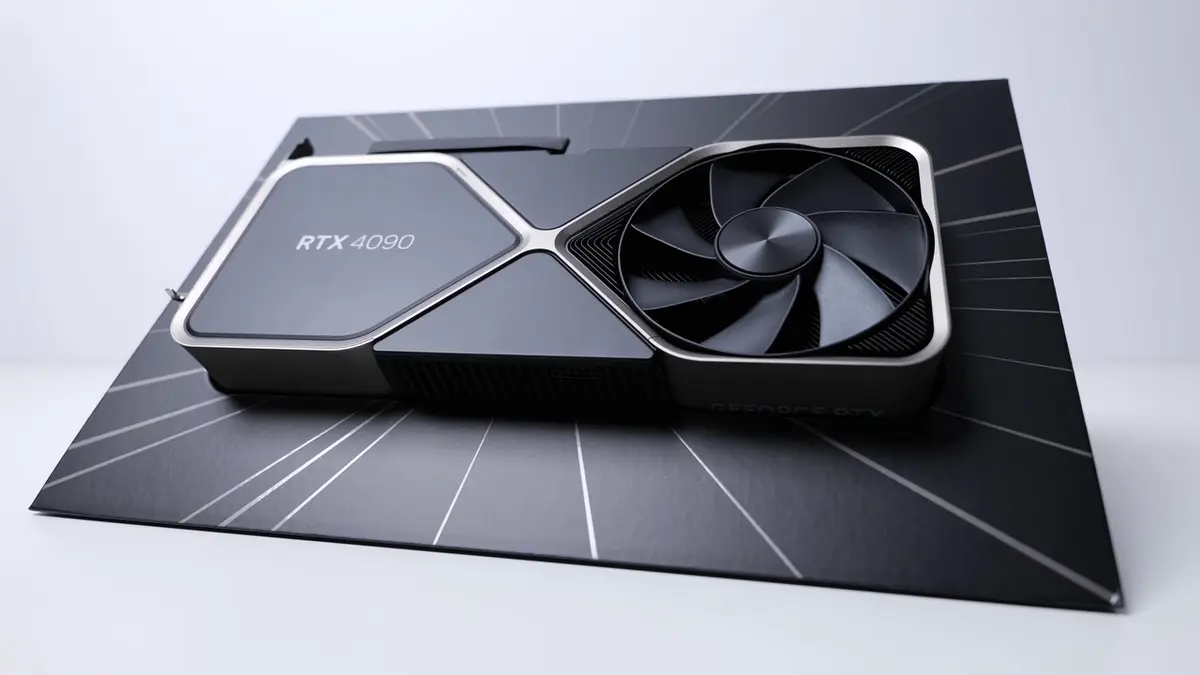
NVIDIA GeForce RTX 4090
24GB GDDR6X24GB VRAM handles virtually every consumer AI workload — LLM inference, Stable Diffusion, fine-tuning. The best balance of capability, availability, and price.
Affiliate links — we may earn a commission at no extra cost to you. Amazon ships globally; Shopee SG covers Singapore & ASEAN.
What matters most
- VRAM capacity for larger models and datasets
- Compute performance for training and inference
- Price-to-performance ratio
- Power draw and cooling requirements
If you are new to GPU specs and don’t yet know how much VRAM your workload needs, start with our GPU VRAM guide for beginners — it explains the model-size-to-VRAM math in plain language. For framework-specific picks, our best GPU for TensorFlow guide covers the XLA side.
For users running local AI assistants and chatbots, see our dedicated best GPU for AI assistant guide for inference-specific recommendations. Academic and lab buyers should also see our best GPU for AI research guide for workstation-class options. If you are generating AI music locally with models like MusicGen or AudioCraft, see our best GPU for AI music generation guide. For speech-to-text and transcription with OpenAI Whisper, see our best GPU for Whisper guide.
Best picks by category
| Category | GPU | VRAM | Price | Why |
|---|---|---|---|---|
| Best overall | RTX 4090 | 24GB | ~$2,200 | Handles 34B models, fast inference, proven ecosystem |
| Maximum power | RTX 5090 | 32GB | ~$4,900 | 32GB for 34B+ models, fastest consumer AI GPU — see our RTX 5090 vs RTX 3090 value breakdown if you are weighing used hardware |
| Best value | RTX 4070 Ti Super | 16GB | ~$800 | 16GB and 672 GB/s for well under four figures |
| Best used value | RTX 3090 (used) | 24GB | ~$820 | 24GB and 936 GB/s — the cheapest route to 24GB by a wide margin |
| Best new GDDR7 | RTX 5070 Ti | 16GB | ~$1,050 | Blackwell, 896 GB/s, FP4 support, full warranty |
| Best budget | RTX 4060 Ti 16GB | 16GB | ~$425 | Cheapest way to get 16GB VRAM for AI |
| Cheapest entry | Intel Arc B580 | 12GB | ~$310 | 12GB on a new card, if your tools support oneAPI |
VRAM and bandwidth above are manufacturer specifications, not our estimates — the NVIDIA figures come from its GeForce comparison page. The prices are street prices and they move; the specs do not.
Check NVIDIA GeForce RTX 5090 on Amazon→Buy on Shopee SG→ Check NVIDIA GeForce RTX 4070 Ti Super on Amazon→Buy on Shopee SG→Who should buy what
If you run large local models or heavy image workloads, prioritize VRAM. If you want the best overall balance, a high-end consumer GPU is usually the practical sweet spot.
Which GPU should YOU buy?
- On a tight budget? The RTX 4060 Ti 16GB (~$425) gives you 16GB VRAM — enough for 7B-13B models and Stable Diffusion XL.
- Want the most VRAM per dollar? A used RTX 3090 (~$820) is 24GB for roughly a third of the RTX 4090’s price, with 936 GB/s of bandwidth behind it.
- Want the best all-rounder? The RTX 4090 (~$2,200) with 24GB VRAM handles virtually any consumer AI workload including 34B models, with a warranty the used market cannot offer.
- Need maximum performance? The RTX 5090 (~$4,900) with 32GB VRAM is the most powerful consumer AI GPU available.
- Don’t want to buy hardware? Cloud GPUs let you run any model size without upfront investment — see our RunPod vs Vast.ai comparison to pick the right cloud GPU platform for your workload.
Common mistakes to avoid
- Buying a GPU with insufficient VRAM and hitting out-of-memory errors on day one
- Overspending on compute power when your workload is actually VRAM-limited
- Ignoring power supply requirements — NVIDIA specifies 850W of system power for the RTX 4090 but 1,000W for the RTX 5090, so a PSU sized for last generation’s flagship is not enough for this one
- Choosing AMD without verifying CUDA/ROCm compatibility for your specific tools
- Assuming a Mac with Apple Silicon is a substitute for a dedicated AI GPU — see our Mac vs NVIDIA for AI comparison for where Apple Silicon holds its own and where a discrete GPU wins
Final verdict
For most AI users, the RTX 4090 at ~$2,200 is the safest recommendation. It has the VRAM and speed to handle everything from Stable Diffusion to 34B LLMs, and unlike the used market it comes with a warranty. If you will buy used, a used RTX 3090 at ~$820 gives you the same 24GB for a third of the money — the single biggest saving available on this page. If budget is tight and 16GB is enough, the RTX 4060 Ti 16GB at ~$425 gets you into serious AI work at a fraction of the cost.
NVIDIA GeForce RTX 4090
24GB GDDR6XThe best GPU for AI for most users. 24GB VRAM, fast inference, proven compatibility with every major AI framework.
Affiliate links — we may earn a commission at no extra cost to you. Amazon ships globally; Shopee SG covers Singapore & ASEAN.
The best GPU for AI is the one that matches your actual workload, budget, and VRAM needs instead of chasing peak specs alone.
Frequently asked questions
What is the best GPU for AI in 2026?
For most people the RTX 4090 — 24GB of VRAM covers essentially every consumer AI workload, from Stable Diffusion to 34B-class language models, and it comes with a warranty. Spend less only if 16GB is genuinely enough for what you run, and spend more only if you need the 32GB tier.
How much VRAM do I need for AI work?
16GB is the practical floor in 2026 and 24GB is where you stop working around it. At 16GB you run image generation and mid-sized language models comfortably. At 24GB the 30B-class models and heavier image pipelines open up. Below 12GB you are limited to smaller models and older image workflows.
Is a used RTX 3090 still worth buying for AI?
Yes, and it is usually the best value on this page. It offers the same 24GB as an RTX 4090 for roughly a third of the price, with memory bandwidth close behind. The trade is no warranty and a card that has already had a life, so buy from somewhere that takes returns.
Do I actually need an RTX 5090?
Only if you need more than 24GB. Its 32GB is the reason to buy it — it is meaningfully faster too, but the speed alone rarely justifies the gap over a 4090. If your workloads fit in 24GB, the money is better spent elsewhere in the build.
Can AMD or Intel GPUs run AI workloads?
They can, and Intel’s Arc B580 is the cheapest new card here with 12GB. The catch is tooling rather than hardware: most AI software is written against CUDA first, so expect more setup friction and slower support for new models. Choose one if price per gigabyte matters more to you than convenience.